

I use a calendar for one simple reason: I do not want appointments, errands, birthdays, and small commitments competing for space in my head. Samsung Calendar is designed for exactly that everyday problem. It is a free productivity app from Samsung Electronics Co., Ltd., and after spending time with it, I found it most useful when I wanted a quick, familiar planner rather than a separate project-management system.
The app is aimed at Everyone, so its appeal is broad. A student can use it for classes and deadlines, a parent can coordinate school activities, and a professional can keep meetings beside personal plans. Its current reach is enormous, with over a billion installs, while its average rating sits at about 4.1 from roughly 113 thousand ratings. Those figures suggest an app that many people depend on, but also one that naturally receives mixed reactions because calendars become very personal once they hold important routines.
How Samsung Calendar feels in daily use
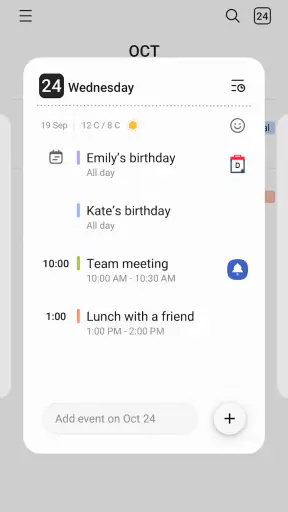
The first thing I noticed is that Samsung Calendar feels built around quick entry and quick checking. I can open it, look at the day or month, and understand what is ahead without moving through a complicated workspace. That matters when I am standing in a shop trying to remember whether I have an appointment later, or when I need to check a date before agreeing to plans.
The interface is particularly comfortable for someone already using a Samsung phone. The app belongs to the same ecosystem as the device, so it feels less like an extra service I have deliberately added and more like a natural part of the phone. That familiarity reduces the small friction that often makes people abandon planning apps: too many screens, too many settings, or a design that asks me to organize my life before I have even entered the first event.
I would not describe it as a complete personal productivity command center. Its strength is the calendar view itself: seeing time commitments, adding events, and keeping a reliable visual record of what is coming. If I need detailed task dependencies, team project boards, or a large knowledge base connected to every appointment, I would look elsewhere. Samsung Calendar is better when the main question is, “What is happening, and when?”
That focus also makes it approachable for occasional users. Someone who only needs reminders for medical visits, bill dates, family occasions, or travel plans does not need to learn a complicated workflow. I can start with a few important events and gradually make the calendar more useful instead of setting up an elaborate system on the first day.
Choosing the right view for the job
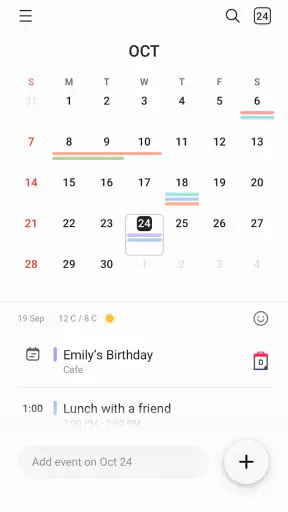
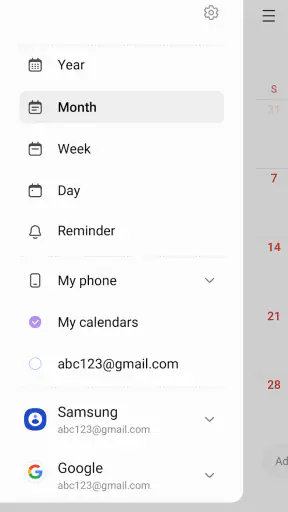
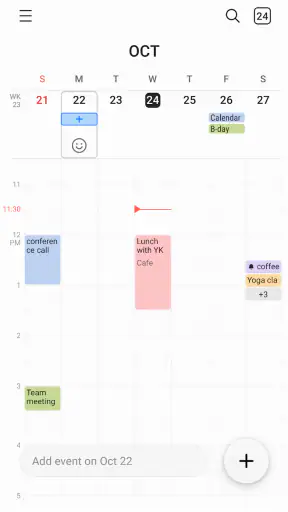
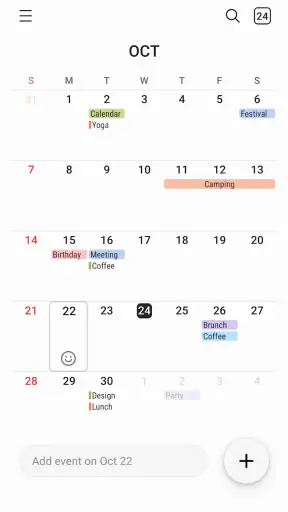
I find the month view best for planning ahead. It gives me the shape of a busy period and helps reveal conflicts before they become urgent. A day view is more useful when I am managing several appointments close together, while a broader schedule view helps me judge whether a week is realistic rather than merely full.
One practical habit is to use the calendar at two different speeds. I check the month view when arranging future plans, then switch to the day or schedule view each morning. This prevents the common mistake of treating a calendar as something opened only after a reminder appears. The visual overview is valuable because it shows empty space as well as commitments, which helps me avoid filling every available hour.
Color organization can also make a difference, but I recommend keeping it restrained. If every event has a different color, the screen becomes decoration rather than information. I get more value from a small visual distinction between work, personal appointments, and family plans. The purpose is not to make the calendar attractive; it is to recognize the type of commitment at a glance.
Adding events without creating future confusion
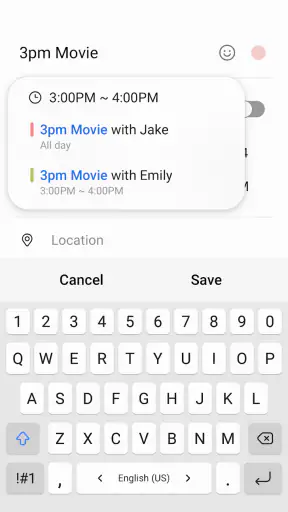
Fast entry is useful, but speed can cause problems if an event is saved with a vague title or the wrong time. I try to write event names that explain the action, not just the subject. “Call dentist to confirm” is more helpful than “Dentist,” especially when I look back at the month later. For appointments outside my usual area, I also include enough context to remember what I need to bring or prepare.
Recurring events deserve extra care. A weekly commitment may look harmless when I create it, but it can continue long after my routine changes. I treat recurring entries as something to review occasionally, especially after a change in work hours, school terms, or exercise habits. This is one of the less obvious ways a calendar can become unreliable: not because the app failed, but because an old repetition quietly remains in place.
Another useful workflow is to create a preparation event rather than relying only on the appointment itself. For a trip, I might add a separate reminder to check documents or pack essentials. For a meeting, I may reserve time beforehand to read notes. This turns the calendar from a record of obligations into a lightweight planning tool without pretending to replace a full task manager.
Where it fits among familiar alternatives
Compared with a paper planner, Samsung Calendar is easier to change. Appointments move, recurring plans evolve, and reminders can be checked from the phone instead of being carried on another page. The trade-off is that a paper planner can feel calmer and more deliberate, while a digital calendar can become noisy if I enter every minor thought.
Compared with a general-purpose calendar service, Samsung Calendar feels more native on a Samsung device. That is a real advantage for people who want less setup and a consistent phone experience. On the other hand, users who regularly move between different platforms, share calendars with people using other ecosystems, or depend on a specific online calendar workflow may prefer a service designed around broad cross-platform collaboration.
It also differs from task apps. A task list answers what I need to do; a calendar answers when something occupies time. I do not use Samsung Calendar as a replacement for a detailed task manager when an assignment has several steps. Instead, I put the deadline or scheduled work session in the calendar and keep the individual actions somewhere better suited to them. That separation prevents the calendar from turning into an unreadable list of unfinished intentions.
What has changed, and what current users should expect
The current app is associated with a release date of July 14, 2023, which gives useful context when considering its place in Samsung’s software lineup. I see that release point less as a reason to expect a completely different product and more as a sign that the app continues to be treated as an active part of the modern Samsung phone experience. The developer is Samsung Electronics Co., Ltd., so the app’s identity is closely tied to the company’s hardware and software environment.
For an existing user, the important question is not whether the calendar has a dramatic new personality. It is whether the everyday basics remain dependable: opening quickly, showing commitments clearly, and letting me adjust plans without rebuilding my schedule. In my experience, the value of an established calendar is often cumulative. Years of birthdays, recurring appointments, and personal routines make continuity more important than flashy redesigns.
That continuity can be reassuring, but it also means long-time users should periodically tidy their calendars. I would review old recurring events, remove temporary reminders, and check whether categories still make sense. A cleaner calendar makes any later update easier to judge because I can tell whether a change improves my workflow instead of confusing it with years of accumulated clutter.
I would also avoid assuming that a release date tells me everything about the present experience. Apps in this category can evolve through ongoing maintenance, device integration, and interface adjustments. What I can say confidently is that Samsung Calendar remains positioned as a mainstream, free productivity tool rather than a niche planner. Its broad adoption gives it practical credibility, while the rating shows that popularity does not make it perfect for everyone.
How existing users can get more from it
The best improvement may come from changing how I review the calendar, not from changing the app. I scan the next day in the evening, then look farther ahead once a week. During the weekly review, I check travel time, preparation needs, and conflicts between personal and work commitments. This catches problems that a last-minute notification cannot solve.
I also recommend separating fixed events from flexible work. A doctor’s appointment belongs directly on the calendar because its time is fixed. “Work on presentation” may be better placed as a planned block only when I know how much time it needs. This distinction keeps the calendar honest. If I fill it with optimistic blocks that I repeatedly move, I stop trusting the schedule.
For families, the app works best when event titles are written for the person who will actually read them. Instead of relying on personal shorthand, I use clear names that explain the child, location, or required action. That small discipline is especially helpful when someone else checks the phone and needs to understand the plan immediately.
For students, I would use it for exams, submission dates, class times, and study sessions, but not as the only place for notes or assignment details. A calendar entry can hold the moment that matters; supporting material belongs in a notes or study system. This keeps the calendar readable during busy periods.
Where the experience still has limits
The biggest limitation is also the app’s defining simplicity. People who want deep collaboration, sophisticated project planning, or a unified space for documents and tasks may find it too narrow. It can help me remember a presentation, but it is not the ideal place to manage research, drafts, approvals, and multiple owners of that presentation.
There is also a mental cost to relying heavily on any digital calendar. Notifications can create the illusion that everything is under control, even when the schedule is unrealistic. Samsung Calendar can show me that I have three commitments in one afternoon, but it cannot make the travel between them shorter or decide which plan should be declined. I still need to use judgment rather than treating every free space as available.
Users who dislike ecosystem dependence should think carefully before making it their only planning tool. The native experience is a strong reason to choose it on a Samsung phone, but people who frequently change devices or coordinate with others across different platforms may value portability more than integration. In that situation, a broadly shared calendar service may be the safer long-term choice.
I would also skip it if what I really want is a habit tracker, a visual project board, or a detailed personal knowledge system. Those tools may connect to dates, but their central workflows are different. Choosing Samsung Calendar for a problem it was not designed to solve would lead to unnecessary frustration.
Questions I would ask before installing it
Is it suitable for everyday personal scheduling? Yes. I would choose it for appointments, birthdays, recurring routines, classes, travel plans, and reminders tied to a specific date or time. It is especially appealing when I already use a Samsung phone and want a familiar calendar without paying for another app.
Can it replace a task manager? Only for simple, time-based actions. If a task has many steps, needs notes, or must be prioritized independently of a date, I would pair the calendar with a task app. The two tools complement each other better than either one pretending to do the other’s job.
Is it a good choice for shared planning? It can be useful when the people involved already fit comfortably within the same device and calendar habits. For larger groups or mixed platforms, I would first consider how easily everyone can see, edit, and understand the same schedule. Convenience for one person is not enough if coordination is the main purpose.
Should a new user migrate everything immediately? I would start with future commitments and important recurring events, then add older information only when it becomes relevant. A huge migration can make the calendar feel crowded before I understand how I want to use it. Starting small also makes it easier to notice which views, colors, and reminders actually help.
My recommendation for the next stage
What I would watch going forward is not a demand for more features at any cost. The most valuable direction would be preserving clarity while making planning more useful for people whose schedules are becoming complicated. Any improvement should help me distinguish fixed commitments from flexible plans, prepare for events, and keep recurring entries trustworthy without turning a simple calendar into a complex dashboard.
That balance matters because the app’s large installed base includes very different users. Some want nothing more than a dependable monthly view. Others are trying to coordinate work, family, travel, and personal goals from one screen. The challenge is adding depth without making the basic experience feel like a project in itself.
My final view is positive but specific: Samsung Calendar is a strong everyday choice for Samsung users who want a clean, free way to organize time. I like its familiar approach, its usefulness for quick checks, and the way it supports practical routines when I use it deliberately. I would not choose it as my only productivity system for complex projects or broad cross-platform teamwork.
If you treat it as a calendar rather than an all-purpose life manager, it makes sense. Add clear event names, review recurring plans, leave room for preparation and travel, and keep detailed tasks elsewhere when necessary. With those habits, Samsung Calendar becomes more than a place to store appointments: it becomes a dependable view of how I am actually spending my time.
For me, that is the app’s strongest quality. It does not need to turn scheduling into a performance. It simply gives everyday plans a visible home, and that is often enough to make a crowded week feel manageable.


